 Xeno Leads
Why Do My Google Ads Bring In So Many Spam Calls?
The short answer
Most of it isn't true spam. It's salespeople who saw your ad, people asking about a service you don't offer, and short hang-ups. Your call details report, call recordings, a sensible minimum call length and the search terms report let you tell those apart from real leads and cut the ones you're paying to attract.
You turned on ads to make the phone ring. Now it rings, and it's someone selling you a website, someone asking about a job you don't do, or three seconds of nothing and a click.
Are these calls really spam?
Mostly, no. Most of what owners call spam from ads falls into three groups, and each one has a different fix.
- Solicitors who saw your ad. Marketing companies, listing sellers, lenders. They're real people who found you the same way your customers did. The ad worked. The caller just isn't buying.
- Wrong-service callers. Google calls these "unwanted calls": people asking about products or services that differ from what you offer. Google says they can happen when your call ad or call asset shows up for a general keyword. Google's own example is a home security company bidding on "security" and getting calls from people searching for "social security" (Google Ads Help).
- Short hang-ups. Wrong numbers, pocket dials, robocalls, and people who hear a greeting and hang up.
There's a fourth kind worth naming: callers claiming to be from Google. Google says it will never guarantee you a special spot in its products and will never ask for payment information over the phone (Google Business Profile Help). If a caller promises either, hang up.
Are they being counted as leads?
They can be. Google counts a call from your ad as a conversion in one of two ways: its AI reviews the call recording, or the call lasts longer than "a minimum duration you set." If a call isn't recorded, it falls back to the duration (Google Ads Help). Most hang-ups fall under that line. A solicitor who keeps you on for three minutes doesn't.
Call recording is now on by default, unless you turned it off before or you're in healthcare or financial services (Google Ads Help). It only covers calls to U.S. or Canadian numbers that go through a Google forwarding number, not calls from location assets. Callers hear a short message that the call will be recorded. If you have questions about recording calls in your state, ask your phone provider or an attorney.
Why it matters: whatever counts as a conversion is what automatic bidding goes looking for more of. More on that in counting the wrong things as leads.
How do I tell the junk from the leads?
Look at the calls themselves, not the Conversions column. Here's how to check it yourself this week.
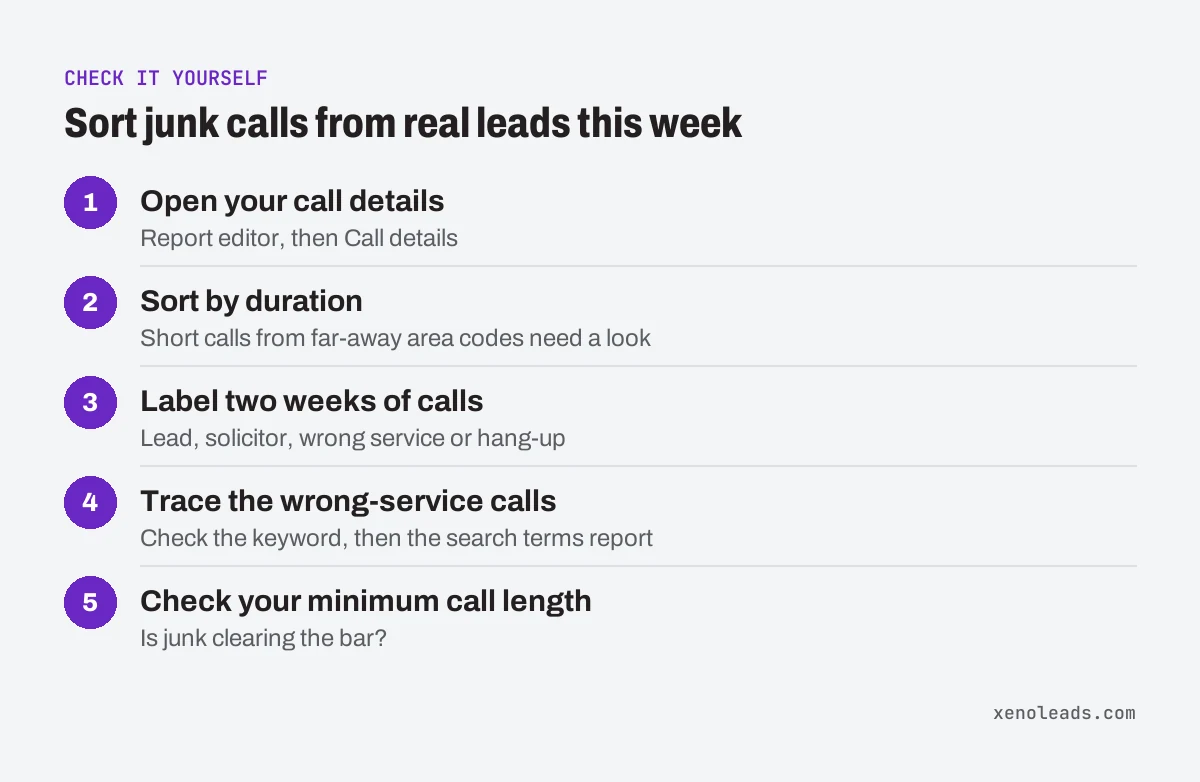
- Open your call details. Click Campaigns, expand Insights and reports, choose Report editor, and under Ads and assets pick Call details (Google Ads Help). (If the menu has moved, search for "call details" in the account's search bar.) If it's empty, call reporting may be off. Google says to turn it on under Account settings, in the Call reporting section (Google Ads Help).
- Sort by duration. The report shows start time, duration, caller area code, missed or received status, the search keyword and, if recording is on, the recording. The caller's phone number shows for most calls over 15 seconds (Google Ads Help). Short calls from area codes nowhere near your service area are worth a second look.
- Label two weeks of calls. Listen to the recordings if you have them, or match the times against your own phone. Mark each one: lead, solicitor, wrong service, or hang-up.
- Trace the wrong-service calls. Check the search keyword on those calls, then open the search terms report: Campaigns, then Insights and reports, then Search terms (Google Ads Help). Look for searches that don't match what you do. Google leaves out some low-volume searches for privacy, so you won't find every one. Here's how to read that report and add negatives.
- Check your minimum call length. Compare it with how long your hang-ups and solicitor calls last. If junk is clearing the bar, here's how to pick the number.
What does a fix look like?
Here's a made-up example. Ridgeback Towing (not a real shop) bids on the word "towing" and keeps getting calls from people asking how much their pickup can pull. Those callers searched things like "towing capacity." Adding "capacity" as a negative keeps the ad off those searches, so those calls should taper off.
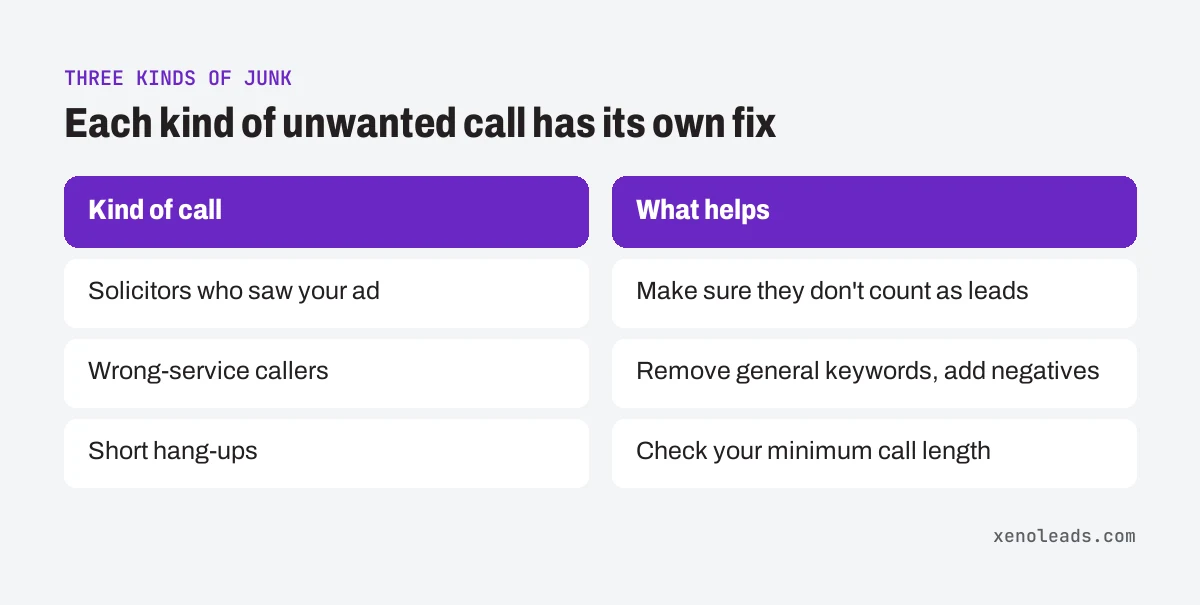
Google's own advice for unwanted calls is the same idea: remove general keywords that put your ad on unrelated searches (Google Ads Help). Google also mentions pausing the call ad or call asset, but that cuts your real calls too.
Solicitors are different. They're searching for businesses like yours, so no keyword change keeps them out. The fix there is making sure they don't count as leads. For calls pretending to be Google, Google suggests asking your phone company to block the number and reporting fraud to the FTC (Google Business Profile Help).
What we do about it
In the accounts we run, we go through search terms every week and add negatives for the searches bringing in wrong-service calls. We set the minimum call length from the shop's own calls, not a default, and we track calls so the monthly report shows which ads made the phone ring. Junk calls still happen. The goal is that they don't get counted as leads and don't get more of your budget.
Want to check the rest?
Junk calls usually point to bigger leaks, like paying for searches you'd never take or not knowing which ad made the phone ring. The free Lead Leak Checklist walks you through 12 of them.
Sources
- About unwanted calls (support.google.com)
- Help protect against fraudulent calls and texts (support.google.com)
- Measure calls from ads (support.google.com)
- Manage your call recording settings and eligibility (support.google.com)
- View details of each call (support.google.com)
- About call reporting (support.google.com)
- About the search terms report (support.google.com)