 Xeno Leads
Your Google Ads Might Be Counting the Wrong Things as Leads
The short answer
Google Ads counts whatever is on your conversion list, not real leads. If page views, phone-number taps, direction requests or very short calls are set as primary conversions, your lead count is inflated and automatic bidding chases the wrong people. Check which actions are primary, switch the junk to secondary, and set lead actions to count One.
Your ad account says you got a pile of leads last month. Your phone says you got a lot fewer. One of them is wrong, and it's usually not your phone.
What does Google Ads actually count as a lead?
Google Ads counts whatever is on your conversion list, and nothing else. It doesn't know what a lead is. It only knows what you told it to count.
Every account has a list of "conversion actions": the things that get added up in the Conversions column. A call. A form. A booked appointment.
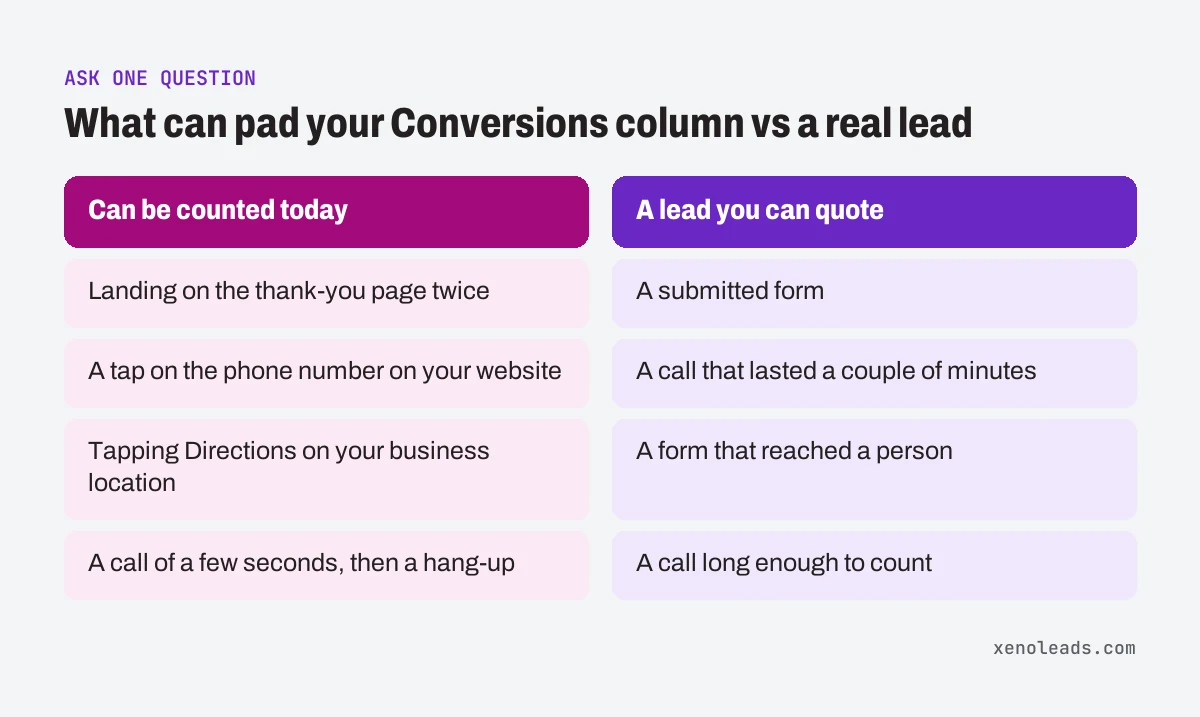
The trouble is that the list fills up over time. Someone links a website tool and it brings its own events. A setup wizard adds a few defaults. A past marketer adds "page view" so the numbers look better. Before long the account is counting things like:
- someone landing on the thank-you page twice
- a tap on the phone number on your website, which is a tap, not a call
- someone tapping Directions on your business location, which Google can count as a "local actions" conversion (Google Ads Help)
- a call of a few seconds from a person who hung up when they heard the voicemail greeting
None of those is a lead you can quote.
Does it matter if the report is a little padded?
Yes, because the Conversions column is also what Google's automatic bidding learns from. If it were only a reporting problem, you could ignore it.
Google calls the actions in that column primary conversion actions. Google says they're reported in the Conversions column and used for bidding, as long as the goal they belong to is used for bidding (Google Ads Help).
So if a page view counts the same as a quote request, Google goes looking for more people who view pages. Those are usually easier to find than people who need a windshield today. Your cost per lead can drop on paper while your phone gets quieter.
There's a second, quieter version of this: counting one lead several times. Each conversion action has a counting setting, One or Every. With One, Google counts only one conversion per ad click. Google's own example sets sales to Every and leads to One, because "you want to track only unique leads" (Google Ads Help). If your form is set to Every, a customer who sends the form three times after one click counts as three leads.
How do I check it myself?
Open the conversion list and ask one question of everything on it. You need a few minutes and admin or standard access to the ad account.
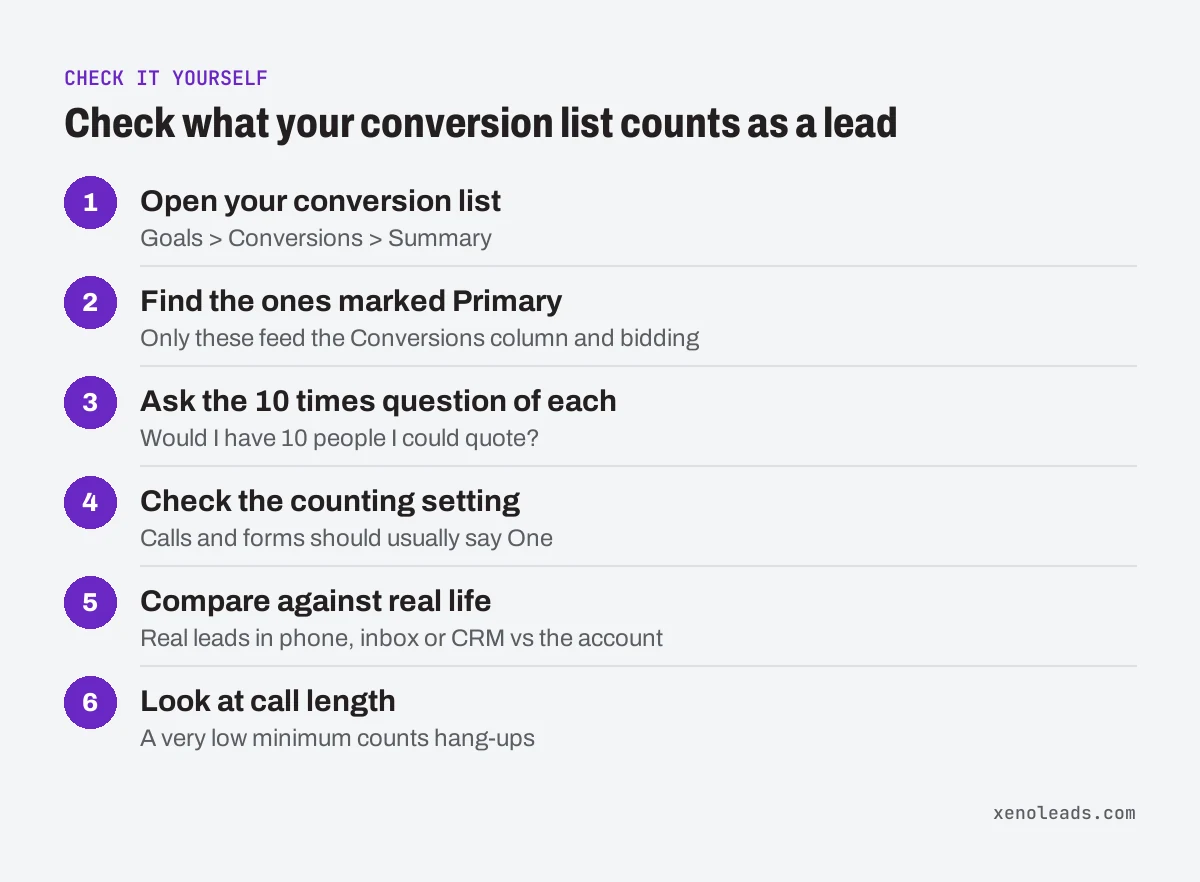
- Open your conversion list. In Google Ads, go to Goals, then Conversions, then Summary (Google Ads Help). (If the menu has moved, search for "conversions" in the account's search bar.)
- Find the ones marked Primary. Every action on this list is either Primary or Secondary. Only Primary ones add up to the Conversions column and steer bidding.
- Ask one question of each Primary action: "If this happened 10 times, would I have 10 people I could quote?" A submitted form, yes. A call that lasted a couple of minutes, yes. A page view, a direction request or a tap on a number, no.
- Check the counting setting. Click into each lead action, choose Edit settings, and look at Count (Google Ads Help). For calls and forms it should usually say One.
- Compare against real life. Pick last month. Count the real leads in your phone, inbox or CRM. Put that next to the Conversions number in the account. If they're far apart, something on the list is counting the wrong thing.
- Look at call length. If calls count as conversions, there's a minimum call length behind it. If it's set very low, hang-ups and wrong numbers count. Here's how to pick that number.
What should I do with the wrong ones?
Switch them to Secondary. Don't delete them.
A secondary action still shows up in the All conversions column, so you keep the history, but Google treats secondary actions as observation only and doesn't bid toward them (Google Ads Help). One exception: if a campaign uses a custom goal, Google says secondary actions in it can still be used for bidding. To make the change, open the conversions summary, find the goal the action sits under, click Edit goal, and pick Secondary (observe only) for that action.
Two cautions:
- Expect the numbers to drop. When you stop counting page views, the Conversions column shrinks and cost per lead goes up. Nothing got worse. You're seeing the real number for the first time.
- Give it time. When the conversion actions a bid strategy optimizes for change significantly, Google can put it into a "Learning" status, which Google says never lasts more than 7 days (Google Ads Help). Make the change once, then leave it alone for a couple of weeks before you judge the results.
What we do about it
Before we touch keywords, ads or budgets in an account we take over, we go through the conversion list. Only the actions that equal a real lead, like a call that lasted long enough or a form that reached a person, stay primary. Everything else is kept as secondary so the history doesn't disappear. That way the monthly report and your phone are counting the same thing.
Want a second set of eyes on it?
If you open that conversion list and aren't sure what you're looking at, book a 30-minute call. We'll go through it with you and tell you what's being counted.
Sources
- About local actions conversions (support.google.com)
- About primary and secondary conversion actions (support.google.com)
- About conversion counting options (support.google.com)
- About bid strategy statuses (support.google.com)