 Xeno Leads
Yes, Local Services Ads Can Charge You for a Call You Missed
The short answer
Yes. Per Google, a missed call during your business hours is a valid Local Services lead if the caller stays on the line more than 20 seconds, and a call that goes to voicemail counts the same way. You pay for that lead whether or not you get the job, so reply fast, ideally with an automatic text.
You were on a job, the phone rang, and you didn't get to it. Then the Local Services bill shows a charge for that call. It's not a glitch. It's the rule.
Can Local Services Ads really charge me for a call I didn't answer?
Yes. Google lists this as a valid, chargeable lead: "You missed a phone call during your business hours and the customer stays on the line for more than 20 seconds" (Local Services Help).
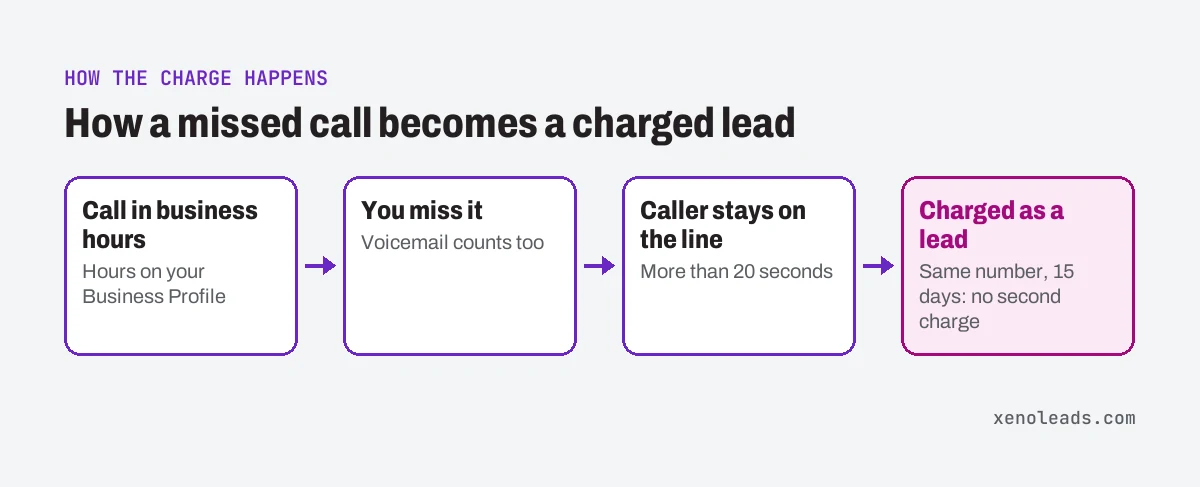
Voicemail doesn't get you out of it. Google says a call that goes to voicemail or an automated greeting during business hours "is treated as a connected call and is charged if the caller stays on the line for more than 20 seconds, whether or not they leave a message" (Local Services Help).
A few details from the same page:
- Phone menus. If your system asks callers to press a key and they hang up without pressing one, you aren't charged. Once they press a key, the 20-second timer starts over.
- Answered calls. The 20-second ring rule only applies to missed calls. If someone picks up, the lead is judged on the conversation, not the ring time.
- Credits. Google says charged leads get reassessed over time and may be credited automatically if they turn out to be low quality.
What counts as "business hours"?
Whatever hours are on your Google Business Profile. Google says "business hours" are "the hours you set in your Google Business Profile" (Local Services Help).
If you also use an ad schedule that's different from those hours, Google says missed calls are only charged when they happen during your active ad schedule and within your business hours (Local Services Help).
So the hours on your profile aren't just for customers. They're the window where a missed call can cost you. If the profile says you're open later than anyone can actually pick up, every call in that stretch is exposed.
If they call again, do I pay twice?
Usually not. Google says once a lead is charged, follow-up calls or messages with that customer aren't charged again, "provided there is interaction within 15 days and the contact comes from the same phone number or email address" (Local Services Help).
If 15 days go by with no activity, a new call from that person is a new lead.
So once that missed call is charged, getting back to the customer doesn't add a new charge, as long as it's the same number and inside the 15 days. The lead is already paid for. The only question left is whether it turns into a job.
How do I keep the job after a missed call?
Get back to them before they call the next shop. The charge lands either way, and the customer is still looking at a list of other shops. The next one is a tap away.
That's the gap a missed-call text-back closes. A short text goes out within seconds to anyone whose call you didn't pick up, so they have a reason to wait for you instead of calling the next shop. Here's the first script from our free Text-Back Scripts, word for word:
Hi, this is {your name} with {business}. Sorry we missed your call, we're on a job right now. What can we help you with? We'll call you back shortly.
It's a person's name, a reason, one easy question, and a promise. Then keep the promise. There's more on how a missed-call text-back works and how to test yours.
One caution. Text only people who contacted you, and when someone says stop, stop. The exact rules for business texting are a legal question, so check with your texting provider or an attorney if you're not sure.
How do I check it myself?
You need about as long as it takes to scroll your recent leads, plus access to your Local Services account.
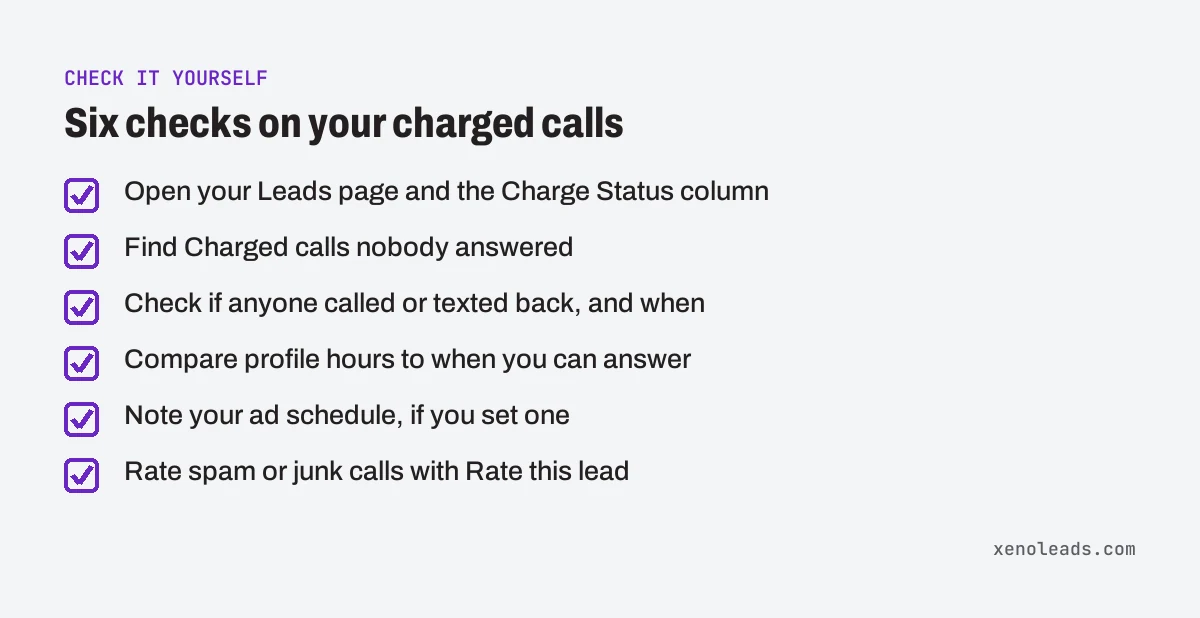
- Open your leads. Google says each lead's billing status shows in the Charge Status column on the Leads page in Google Ads: Charged, Not charged, In review or Credited (Local Services Help). (If the menu has moved, search for "Leads" in the account's search bar.)
- Find the charged calls nobody answered. Go through recent call leads and note every Charged one that you or your crew never spoke to.
- Check what happened next. For each one, did anyone call or text back? How long after? If the answer is "the next morning" or "nobody," that's a paid lead sitting on the table.
- Compare your profile hours to real life. Open your Google Business Profile and look at the hours. Are those the hours someone can actually answer the phone? If not, either fix the hours or make sure missed calls in that window get an instant text.
- Check your ad schedule. If you set one, note when it runs. Missed calls outside it aren't charged, per Google, but they're still customers.
- Rate the bad ones. For spam or junk calls, Google says to open the navigation menu in the upper left, pick Leads, and choose Rate this lead in the top right to send feedback (Local Services Help). Don't count on a credit, though. Google says it no longer supports credits for "job type not serviced" and "geo not serviced" leads.
What we do about it
We don't manage Local Services Ads accounts. What we do set up is the follow-up behind the phone: missed calls get a text back within seconds, and replies land where the owner actually looks. That works the same whether the call came from a Local Services ad, a Google search ad or your truck wrap.
Get the missed-call script
The missed-call text above is script #1 of eight in our free Text-Back Scripts, along with after-hours, holiday hours, new form leads, quote follow-ups and a review ask. Copy it, swap in your name, and send it to the next call you can't take.
Sources
- How leads work (support.google.com)
- About Automated Local Services Ads lead credits (support.google.com)