 Xeno Leads
Why Your Business Texts Aren't Arriving: A2P 10DLC, Explained
The short answer
US carriers want any local number that sends texts from software registered first, a system called A2P 10DLC. Twilio has fully blocked unregistered traffic since September 1, 2023. You register inside your texting or CRM provider, the carriers decide, and common rejections are a thin opt-in description, website problems or a legal name that doesn't match.
You set up an automatic text for missed calls. A customer tells you they never got it. Your screen says "sent," or shows a little red "failed" next to it, and nobody can tell you why.
Why aren't my business texts getting through?
Because US carriers want any business number that texts from software to be registered first, and they block the ones that aren't. The system is called A2P 10DLC.
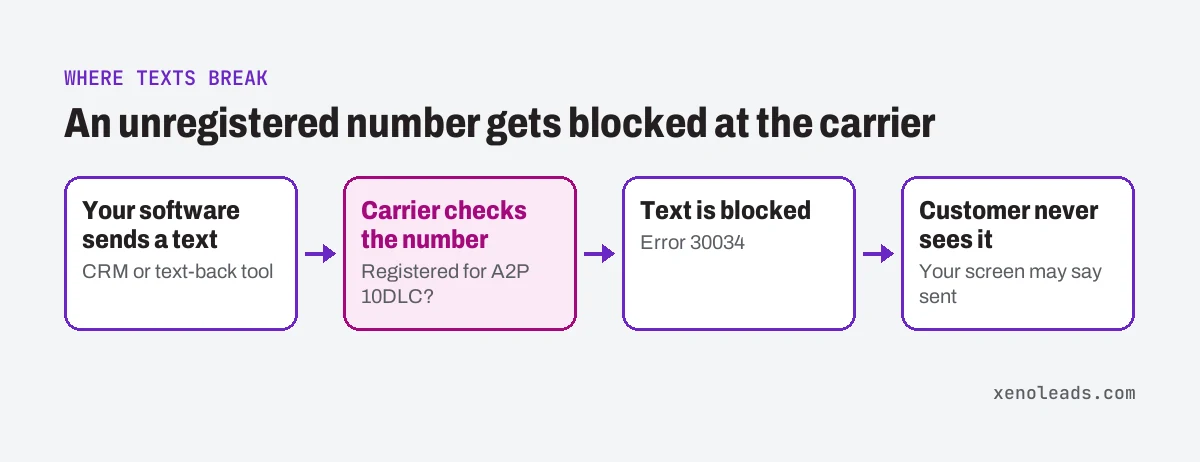
A2P means "application to person": texts sent by software, like a CRM or a text-back tool, instead of you typing on your own phone. 10DLC means "10-digit long code," which is just a normal local phone number. Twilio, a big messaging provider, says anyone sending texts from software over one of these numbers to US phones must register (Twilio Docs).
Since September 1, 2023, Twilio blocks texts to US numbers from unregistered 10DLC numbers. The blocked texts come back with error 30034, and Twilio still charges the messaging rate for them (Twilio Changelog).
So a text-back that "isn't working" may be set up fine. The carrier just isn't delivering it.
What is registration, in plain terms?
It's two forms: one about your business, one about the texts you send. Carriers want to know who's sending and that the people getting the texts asked for them (Twilio Docs).
- The brand is your business: exact legal name, Tax ID, business type, industry and registered address. For a standard US brand, HighLevel says the legal name and EIN should match official IRS records (HighLevel Help).
- The campaign is the texting itself: what the texts are for, sample messages, how people agree to get them, and your website (HighLevel Help).
There are fees, and they differ by provider and brand type. Check your own provider's pricing page rather than a number you saw online.
Who does it, me or my software company?
You fill it in, inside your texting or CRM provider, and the carriers decide. In HighLevel, for example, it's under Settings > Phone System > Trust Center, and HighLevel says carriers and their registration partners make the final approval or rejection call (HighLevel Help).
Other tools have their own screen for it, usually under a name like compliance, trust center or A2P. If you can't find it, ask their support where registration lives.
Carriers review it, and a rejection means fixing and resubmitting. Don't start it the day before you need texts to work.
Why do registrations get rejected?
Usually because something is vague, missing or doesn't match. The common ones:
- A thin opt-in description. Twilio calls opt-in requirements "a major cause" of campaign rejections. Spell out how people agree to texts, how often you text if it's recurring, that they can text STOP to opt out, and that message and data rates may apply. If there's a checkbox on your form, it shouldn't be pre-checked (Twilio Blog).
- A vague campaign description. Twilio's example of one that got rejected: "This campaign sends messages to customers." Say who sends, who receives and why (Twilio Blog).
- Website problems. A site with no content, a password-protected site, or a URL that's misspelled or doesn't match the business name gets rejected. Your privacy policy should say mobile opt-in data isn't shared with third parties or affiliates for marketing or promotional purposes (Twilio Blog).
- Name or tax ID mismatch. HighLevel says the legal name and EIN should match IRS records (HighLevel Help). And Twilio says a business with a Tax ID that applies as a sole proprietor will be rejected (Twilio Blog).
- A free email address. HighLevel lists an invalid brand support email as a rejection reason and wants one on your own domain, not a free provider (HighLevel Help).
A made-up example: Two Pines Pest Control (not a real business) signs up with a free email address, describes its texts as "customer messages," and links a one-page site with no privacy policy. That's three rejection reasons on one form.
Not legal advice, but one rule of thumb: only text people who contacted you or agreed to get texts, and when someone replies STOP, stop. Under the FCC's rule, replies like stop, quit, end, revoke, opt out, cancel and unsubscribe revoke consent, and a request has to be honored within 10 business days (eCFR). An updated version of that rule takes effect November 25, 2026 and changes how far a STOP reaches (Federal Register). For specifics, go to your provider's compliance docs, and check with your attorney for your state.
How do I check it myself?
You need a login to your texting or CRM tool and about ten minutes.
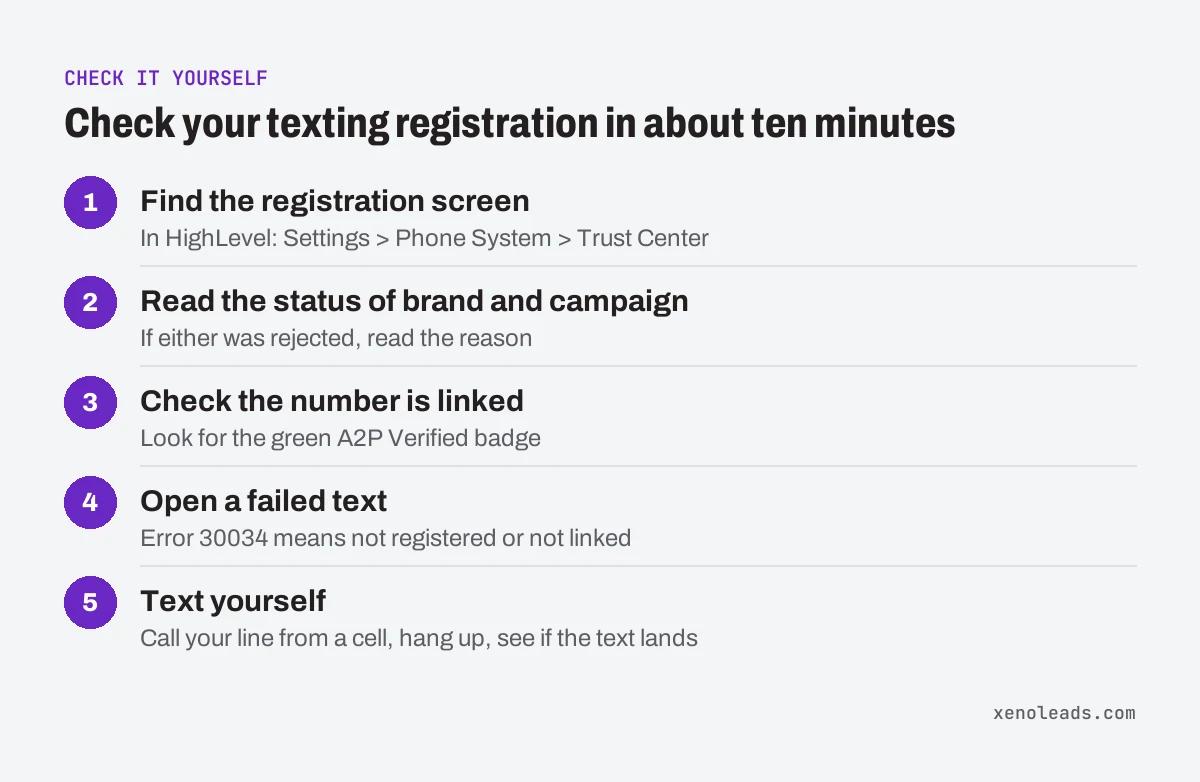
- Find the registration screen. In HighLevel, go to Settings > Phone System > Trust Center (HighLevel Help). (If the menu has moved, search for "A2P" in your tool's help center.)
- Read the status of both parts. Look at where the brand and the campaign each stand. If either was rejected, read the reason. HighLevel says many rejections can be corrected and resubmitted (HighLevel Help).
- Check the number is linked. An approved campaign doesn't cover a number by itself. In HighLevel, open Settings > Phone System > Phone Numbers and look for the green A2P Verified badge. No badge means that number isn't linked yet (HighLevel Help).
- Open a failed text. If it shows error 30034, the sending number isn't registered or isn't linked to an approved campaign. That's not about your wording (HighLevel Help).
- Hold the brand form next to your paperwork. Legal name and EIN against your IRS letter, address, website URL and support email.
- Text yourself. Call your business line from a cell, hang up, and see whether the text-back actually lands.
What we do about it
When we set up the automatic text-back and appointment reminders for a shop, we check that the texting number shows as registered and linked before the first automatic text goes out, then send a test to a real phone. If registration is still pending, we say so instead of assuming the texts are landing.
Get the scripts
Once your number is approved, you need something worth sending. Our free Text-Back Scripts cover a missed call, after hours, holiday hours, a new form lead, quote follow-ups and a review ask. Copy, paste, and swap in your name.
Sources
- Programmable Messaging and A2P 10DLC (twilio.com)
- US A2P 10DLC is now a fully verified route, Twilio Changelog, Sep. 01, 2023 (twilio.com)
- What is A2P 10 DLC, Brand and Campaign Registration (help.gohighlevel.com)
- Improving Your Chances of A2P 10DLC Registration Approval (twilio.com)
- Campaign Rejection Reasons and Resolutions (help.gohighlevel.com)
- 47 CFR 64.1200 Delivery restrictions, eCFR, up to date as of 2026-11-16 (ecfr.gov)
- Enhancing the Ability of Consumers To Control the Robocalls, Federal Register final rule, Oct. 26, 2026 (federalregister.gov)
- Error 30034, Linking a Phone Number to an Approved A2P Campaign (help.gohighlevel.com)